The Musicarta Canon Project
Pachelbel Canon
Pachelbel’s Canon in D is perhaps the most famous chord sequence of all time, and the basis of dozens of popular hits. If you can play and understand the Canon chord sequence, there isn’t much in popular music harmony you won’t be able to figure out! Its regular structure also makes it a great springboard for improvising and composition.
Just landed? This is content sample page 2 for the Musicarta Canon Project on video platforms. Click up to the series home page for orientation, or browse the other Canon Project sample pages via the right-hand navigation table.
Thirds in the treble
The Musicarta Canon Project starts building your Canon performance straight away with a string of ‘thirds in the treble’. You learn to play them and then to play variations on them to produce a performance like this Module One target performance.
This essential string of thirds, played here over one of the backing tracks included with the course, is thoroughly taught with video guidance so you can’t fail to learn, even if you don’t read music at all.
As you can hear, even just on their own – and especially with one of the backing tracks – these thirds have lots of potential. You're making music right from the off with Musicarta!
Playing by ear
Can you hear how the simple string of third is being ‘mined’ for music in the module performance? If you already can, you have a talent worth developing. If you nearly can – and think you will be able to learn to – the Musicarta Canon Project is for you!
Every module in the Pachelbel Canon Project has an ‘Audio Challenge’ to help you develop your musical ear. Module One has four simple thirds variations for you to try to play by ear. Here is one of them.
Perhaps you can get it already? The written-out music for all the audio challenges is in the ‘Answers’ section at the back of the course workbook, and the MidiPiano performance video is always given on the module web page.
Adding the bass line
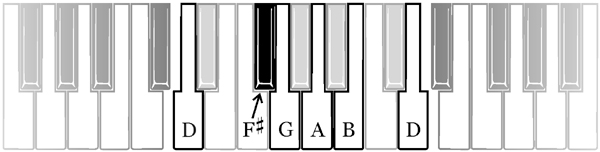
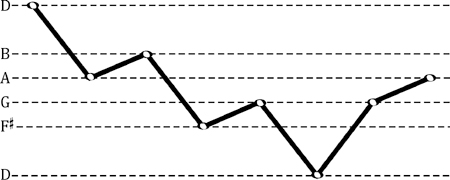
The next step in building your Canon performance is to learn and add the bass line – the eight strong, low notes you’ll hear right at the start of any Pachelbel Canon recording.
Musicarta has lots of ways to make sure the bass line goes into your memory and stays there, as a sound foundation for your performance and improvisation. Here’s the bass line in written-out music.

…and as an audio file for you to copy.
Note that all musical examples in the course have accompanying virtual keyboard performance videos on the module web pages so you can actually see what to play.
Here, the notes are indicated on the keyboard.
...and here as an easily remembered sideways-on shape.
Here are the bass notes combined with some of the thirds variations from Module One.
You can already hear a real performance emerging from just these simple building blocks.
The key of D
The Pachelbel Canon is in the key of D major, which has two sharps (black keys) in its scale. A limited understanding of keys, key signatures and scales holds many popular-styles back. The Canon Project takes positive steps to make sure you are absolutely comfortable in the key of D.
Classical pianists learn keys by practicing scales. The Canon Project includes a scale practice pattern module in D, but advanced exam-type scale-playing is not necessary.
The keyboard diagrams in the Canon project work-book are ‘key-specific’ – they show the keyboard with the key signature already applied. The white keys that are not used are removed and the black keys that are not used are greyed out.

And with all the videos on the course web pages, any tendency to 'forget about the key signature' is much less of a problem!
Playing triads in the right hand
Good modern keyboard players instinctively play three-note chords (triads) in the right hand with the melody note at the top. In Module Three of the Canon Project you add a note to the right hand thirds to make these triads.
Keeping track of three notes at a time isn't easy to start with, so we use two hands, initially, to play the three-note chords.
Here’s a sample performance.
Module Four moves you quickly on to playing these triads with the right hand alone – with special emphasis on helping you keep track of all those shifting notes, and finding the fingers to play them.
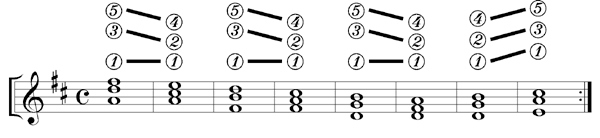
Here’s the MIDI file of that line of chords, playing on MidiPiano.
Learning chords at the keyboard doesn’t get any easier than this - and all the musical examples in the workbook have demo MidiPiano performances like this!
Once you can find the Pachelbel Canon right hand chords, adding the left hand bass line and one of the triad patterns from the previous module gets you this performance.
If you take the triads down an octave and change the hand patterning just a little, you can start to hear the pop-rock potential of your growing keyboard chord knowledge.
Broken chord patterns
‘Broken chord patterns’ are the backbone of the pop-styles keyboard player’s technique. The right hand triad is broken up, with the notes played one after another instead of all at once.
To make the music it easier to understand and create spontaneously, we can use the letters B, M, T as a ‘shorthand’ for the bottom, middle and top notes of the chord. Listen carefully, and match up this music with the audio file below. (The whole-note chords are given just for reference, not played.)
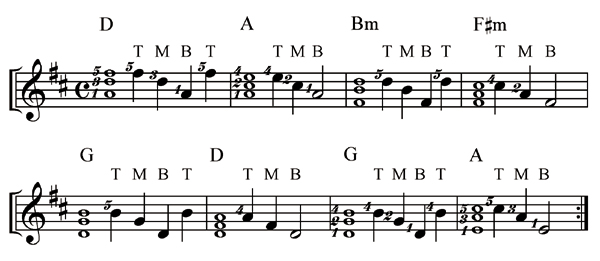
A sample BMT challenge
Here is the BMT coding for the next two-bar pattern.
T B M T │T M B
The rhythm is the same as before, but the middle two notes in the first bar of each pair have been swapped round.
Can you play it?
This is the end the first Musicarta Canon Project sample page, which has shown how you will build up to playing the eight right hand triads, and explore their potential over a simple bass line.
The next sample page shows how we go on to develop the left hand accompaniment, and put the two together for impressive-sounding two-handed chord textures.
The Musicarta Canon Project is a methodical step-by-step programme for building real, useful keyboard chord skills and understanding. If you’re serious about developing your musical talent, jump in and get with the programme!
Click through to the second Pachelbel Canon Project sample page here.
|
OUT NOW! |
THE MUSICARTA BEAT & RHYTHM WORKBOOK At last! An effective approach to keyboard rhythm & syncopation skills. Learn more! |
ONLY $24.95! |


 THE LOGO

THE MUSICARTA
|
The MusicartaA methodical approach to keyboard syncopation for
|
PUBLICATIONS
exciting keyboard
creativity courses
CHORDS 101
WORKBOOK

~HANON~
video course

Musicarta
Patreon
PENTATONICS
WORKBOOK
video course

Creative Keyboard
video course

BEAT AND RHYTHM
WORKBOOK

- Volume 1 -

12-BAR PIANO
STYLES WORKBOOK
MUSICARTA MODES
WORKBOOK
PIANO STYLE
CANON PROJECT
video course
VARIATIONS
video course
- Piano Solo -
video course

- Piano Solo -
YouTube playlists