Developing your Chord Melody
Chord tones are first choice when it comes to writing your chord melody – or playing one by ear! But melodies also uses the notes in between the chord tones.
This page describes how the Musicarta's Pyramids Variations home-study course shows you how a chord melody is put together from chord tones and in-between notes.
You'll be making up your own chord melodies in no time...!
|
The PYRAMIDS VARIATIONS With website audio and video support, the Pyramids Variations provides methodical support for your creative journey, offering pianists of all ages and stages fast-track guidance to a performance beyond expectations and a practical, step-by-step introduction to 'composing at the keyboard'. |
|

Click through to the Pyramids Variations YouTube playlist here.
Here's the Lesson Three Pyramids performance with its simple chord-tone melody.
Here is the Pyramids melody enhanced with in-between notes:
Using the Pyramids Variations, you do not need to be able to read music to make speedy progress. All the key musical examples have audio and MIDI support. Look at this example:
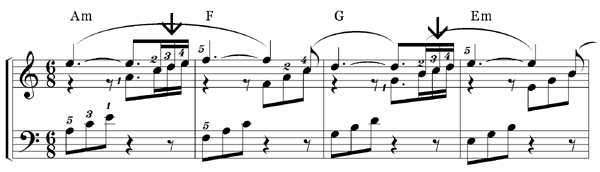
Beneath the graphic in the Pyramids Variations pdf document, you'll find the reference numbers for the audio file and MIDI files in your study download.
You can play the mp3 audio clip on any media player, but when you play the MIDI file on the MidiPiano virtual keyboard (included in the download), you'll see-and-hear this.
Watch it on MisterMusicarta YouTube
MidiPiano has slow-down,
repeat and zoom controls - you'll can't help 'getting it'. Lots of
Musicarta learning material has MIDI support.
The Pyramids Variations shows you how to play a chord accompaniment and a melody at the same time, then how to make the melody more interesting with those in-between 'non-chord tones' ( - you'll even be talking like a musician!).
It's the basis of popular keyboard style, all gathered together in one package.
|
The PYRAMIDS VARIATIONS Home-study download comprising a 150-page PDF, 200-plus MIDI files of the musical examples and a free ‘virtual keyboard’ MIDI file player. Study online with audio files of all examples and 50-plus how-to videos. A comprehensive creativity booster for every keyboard player. |
|
Click through to the Pyramids Variations YouTube playlist here.
But in Lesson Four, you've already expanded your chord accompaniment to the impressive four-chord version. When you add your developed chord melody on top, your performance sounds like this.
And you can apply the techniques you learn in the Pyramids Variations to any chord sequence and melody - any song, in fact.
Please continue to explore the Pyramids Variations by clicking through to Sample Lesson Six. You'll see how the Pyramids version you already know gets expanded into the 32-bar song form a huge number of popular songs and jazz standards are built on. Use the links in the series navigation box in the right hand column, or link up to the Pyramids Variations home page for details of the download contents and study methods.
Thanks for visiting MUSICARTA! Come again soon!
|
OUT NOW! |
THE MUSICARTA BEAT & RHYTHM WORKBOOK At last! An effective approach to keyboard rhythm & syncopation skills. Learn more! |
ONLY $24.95! |