Home
PYRAMIDS
CANON PROJECT
ENYA
BLUES & 12-BAR
TRANSPOSING
CHORDS
SCALES
PENTATONICS
RHYTHM
COMPTINE
MODES
MIDI PIANO
WHAT'S NEW?
MUSICARTICLES
SEARCH THE SITE
SOUNDS - TOC
SITE MAP
SOURCES
CONTACT US
STYLES

Subscribe To This Site
XML RSS
Add to Google
Add to My Yahoo!
Add to My MSN
Subscribe with Bloglines
 

SONGWRITING TECHNIQUES

Adding a Chord-tone Melody

Songwriting Techniques – Adding a Chord-tone Melody is Lesson Three of The Pyramids Variations, a series of free graded online piano lessons from Musicarta.com. You should be familiar with the material in Lessons One and Two of the series before starting on this lesson.

For an overview of the Pyramids Variations series (and to get started), visit the series covering page. To find out about more free piano lessons online from Musicarta.com, go to the Musicarta.com home page via the navigation bar on the left.

In The Pyramids Variations Lesson Three, you are going to add a melody to the Basic Music-making Position (BMP) notes of the Pyramids music. Here is what your lesson performance will sound like:


The file in the right hand cell of the table above is the MIDI file of the performance you will learn in this module. Played on MidiPiano, Musicarta's recommended 'virtual keyboard', it will look-and-sound like this:

This text you don’t see

If you download and install MidiPiano - it's quick, easy and safe! - you can see what to play and use the application's slow-down, repeat and zoom features to help you learn more quickly.

Learn more about playing Musicarta MIDI files here.

    Finding the new melody notes

Chords in a chord sequence on their own aren’t enough to make a piece of music, or a song. We expect to hear a tune, or melody, as well, and in this Pyramids Variations lesson we add that melody note to the Pyramids chord sequence.

In the melody-added version of Pyramids, there is only one new note in each bar – and all the notes from the previous versions are still there.

The new melody note is in the most important position – the highest note, right at the start of the bar – so it is played at the same time as the lowest BMP note – the left hand little finger note (LH5).

Here is a sketch of the music so you can see what all this means. The circles are the new melody notes; the rising slashes are the groups of six BMP chord notes.

songwriting tecchniques - adding a melody


(The audio and midi performances are the same as in the Lesson introduction.)

Note that this ‘sketch’ music isn’t meant to be played from. It’s for you to look at only, in order to form an overall picture of the music in your mind’s eye. You will ‘get the picture’ better if you squint at the sketch music above through half-closed eyes. Check off the following five points against the sketch music.

  1. There is only one new note in each bar.

  2. This new melody note is in the most important position – at the top, right at the start of the bar.

  3. The new melody is played at the same time as the lowest BMP note – the left hand little finger note (LH5).

  4. The new melody note is always a BMP chord tone.

  5. All the notes from the Pyramids with Left-hand-over Patterns are still there, but the Introduction has been dropped.

The numbered points above illustrate songwriting technique in general.

If chords come to you first when you’re 'just messing about at the keyboard' promoting your top chord tones to melody status is an obvious but invaluable songwriting (or melody-writing) technique.

If tunes come to you first, this is still true. Your melody note – especially on strong beats like the first beat of the bar – will usually be the top chord tone of the supporting chord.

    The melody notes added to a chord chart

Here are the new melody notes written into a chord chart above the chord symbols you already know.

Melody notes added to a chord chart

Note that in bars 8 and 16 the LH-over note has been ‘promoted’ into the melody. Apart from those two bars,

  • only the right hand plays the notes in the ‘Melody’ rows in the chart, but

  • both hands still play the BMP notes indicated by the chord symbols in the ‘Chord’ rows.

So the right hand now has a double job – melody notes and chord tones.

The little arrows in the chord chart show how the melody and the chord roots move either up or down when the chord changes. Notice that the melody and chord roots usually move in opposite directions. You will see this more clearly in the diagrams that follow - shapes are a good way to remember music.

Now, without trying to play the music, look at the music sketch again to see how both the music sketch and the chord chart show the same thing in different ways.

    Learning the new version

The next musical example shows the new melody notes and the chord roots for the whole version, all squeezed into one line of music. (The LH-over notes are not shown.)

Melody and roots


Learn these two zigzag lines of notes. There is a keyboard picture further on to help you read the music, plus the audio file and the MIDI source for you to watch the music playing in MidiPiano or Synthesia.

Use your index (pointing) fingers for to play the notes, so that your arm physically moves from side to side, following the zigzag shape of the two musical lines.

    Seeing the music as shapes

If we join the notes up and take away all the other lines, we can start to see the ‘shape’ of the two musical lines more clearly. Observing musical 'shape' can be very helpful in learning music.

You might also notice how the two lines mainly move in opposite directions.

melody and roots as shapes

Listen to the audio file again and see if you can 'hear' the zigzag shape of the lines.

Try to play the one-line study by looking just at this zigzag line diagram. Your starting notes are E in the right hand, and A in the left.

    A diagram of the new version

Now let’s look at all we know about this new version in one diagram.

music in diagrams

You can see

  • the written music of the new melody notes and the chord roots at the centre of the diagram,

  • the zigzag shapes of the new melody notes (above) and the chord roots (below), and

  • where to find the notes on the keyboard.

You might find if you try now that you can already play the melody-added version of Pyramids given in the audio file. All you have to do is fill in the other five BMP notes after the left hand little finger – LH3, LH1, RH1, RH3 and RH5, then the next melody note, and so on.

    New right hand fingering

When we add the melody notes to the Pyramids in BMP (Lesson One) notes, we find that it’s better to play the right hand BMP notes with fingers 1, 2 and 4 so that we have the right hand little finger (RH5) free to play the new melody note at the start of the next bar.

There is another advantage. If we use fingers 1, 2, and 4 for our right hand BMP notes, the new melody note (at the start of the next bar) is right there waiting under RH finger 5, next door to the last right hand BMP note.

Here is a sample of what the right hand actually plays in this ‘melody-added’ version, with the new fingering given.

The melody

Here is what you are actually looking at in the music above:

music analysis

The first note in each bar is the new melody note. The other three notes in the bar are the right-hand BMP notes indicated by the chord symbols Am, F and so on. Using fingers 1, 2 and 4 doesn’t change which notes we play – they’re still the same three ‘play one, miss one, play one, miss one, play one’ notes as before.

If you added the three left hand BMP notes indicated by the chord symbol (Am, F etc.), starting at the same time as the new right hand melody note, you would be playing the melody-added version!

    Building up to your performance

Here's an easy reference reminder of what the Pyramids: Adding the Melody' performance sounds like:


Build up to it this way:

  • Play the Lesson Two version a few times first, with or without the Introduction.

  • Remind yourself of the zigzag shape of the melody and the chord roots using the one-line study and the diagrams in this lesson.

  • Add the new melody notes to the Lesson Two performance. You play these new melody notes with RH5 (the right-hand little finger) at the same time as LH5 (the left-hand little finger) starts playing the six BMP notes.
You can download and print a copy of the music for the ‘Pyramids: Adding the Melody’ version via this link, but it is quite complicated to look at. Unless you read music quite well it will probably just slow you down.

Try to play the new version without music first, using the audio and MIDI files and the various diagrams in this module instead. Here is the chord chart with the melody notes added again, just as a reminder.

LESSON THREE: POSTSCRIPT

This added-on section is in two parts. The first is about lead sheets, and every pianist and keyboard player interested in popular music should study it carefully.

The second part is about ‘bringing out the melody’. There’s a special audio file to help you understand this important idea.

    Lead sheets

Popular musicians often play from music where only the melody and some chord symbols are given. Music like this is called a ‘lead sheet’ (pronounced ‘leed’) because it shows what the lead instrument is playing: the melody.

The lead sheet version of ‘Pyramids: Adding the melody' looks like this:

typical easy lead sheet

You can open and print a pdf of the lead sheet here.

Here's what just the melody notes - the only notes you see in the lead sheet version - sound like:


Looking at the lead sheet, you see straight away that there is no piano chord accompaniment. There are no non-melody notes at all - there isn’t even a stave (set of lines) in the written music for the left hand. The only clues to the accompaniment are the chord symbols and the time signature.

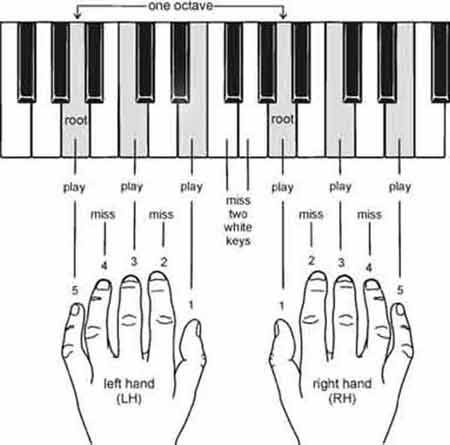
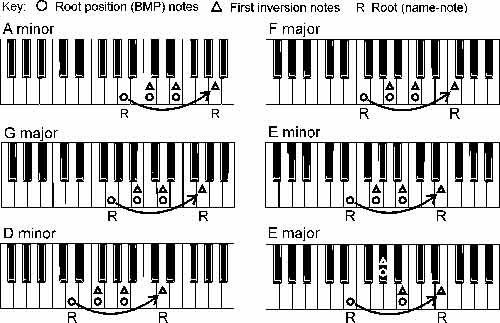
If you know about the Basic Music-making Position, the chord symbols will tell you how to find chord tones which go with the melody, You will put your left hand little finger and right hand thumb on the named note, and the play one, miss one, play one, miss one, play one pattern will give you the right notes.

The time signature will tell you what rhythm your accompaniment must fit into. The time signature here is six-eight, which is counted:

“ONE–and–a TWO–and–a ONE–and–a TWO–and–a…”

There are six notes in the Basic Music-making Position, so playing them all will fill the bar perfectly.

Now play the ‘Adding the Melody’ version of Pyramids from the lead sheet alone. Try making the melody notes shown in the lead sheet 'stand out' (more about this in the next section).

    Bringing out the melody

[NOTE: If you find this discussion too technical, you can skip at any time to the end of the (a) (b) (c) list below and get straight on with polishing your performance.]

Once you add a melody to Basic Music-making Position chord tones in a chord sequence, the BMP notes do not seem so important. They become ‘just the accompaniment’. The melody is now the important thing, and we help the listener appreciate it by playing it a little louder than the accompaniment. This is called ‘bringing out the melody’.

In written music, to set the melody apart from simple chord tones and to remind the performer to make it stand out, the stems of the melody notes often go up where they would normally go down. (The opposite applies to the chord tones.)

In the full written-out music for ‘Pyramids: Adding the melody’, you can see that some of the right-hand BMP notes also have stems going up. They have been ‘promoted’ into the melody. But all the right hand BMP notes – ‘promoted’ or not – still have their own (down) stems, to remind you where they come from.

Here are the first four bars of the full ‘Pyramids: Adding the melody’ written-out music, with a key to all the things we are talking about.

Annotated MS example

    (a) These stems-up notes just after the bar line are the only new notes in the melody-added version. These are the ‘Melody’ notes in the new chord chart.

    (b) These bracketed groups of six (three left-hand, three right-hand) notes are the Basic Music-making Position notes you played in ‘Pyramids: First Performance’. All the ‘First Performance’ notes are in the new version. The chord symbol above each bar tells you how to find these notes quickly and easily.

    (c) Notes with stems going up as well as down are BMP notes that have been ‘promoted’ into the melody.

The challenge is to play the right hand stems-up (melody) notes a little louder than the accompanying BMP chord tones. Listen to this audio clip to hear a slightly exaggerated version of ‘bringing out the melody’:


Bringing out the melody takes practice. Copy the 'exaggerated' audio file. Yyou can start by just trying to make the right hand a little louder than the left. To achieve sophisticated musical effects, consciously knowing what you want is the essential first step. <


This is the end of Lesson Three of the Pyramids Variations series of free online piano lessons from Musicarta.com. When you’re ready, go on to Lesson Four, where you’ll learn to play an impressive four-chord version – it’s twice as wide and twice as long!

Otherwise, take a break and browse the tabs on the Musicarta.com home page for more great songwriting techniques and tips for creative keyboard work.

Thanks for visiting Musicarta.com! Come back soon!